上一篇讲了 Agent 的核心循环——Thought、Action、Observation 不断交替。但有一个关键环节还没展开:Action 到底怎么执行?
当 Agent 决定"调用天气 API"时,LLM 本身并不能直接发 HTTP 请求。它需要做的是:输出一个结构化的"调用意图",由外部代码来真正执行这个工具,然后把结果喂回给 LLM。
这个机制就是 Function Calling(也叫 Tool Use)。它是 Agent 从"只会说话"进化为"能做事"的关键桥梁。
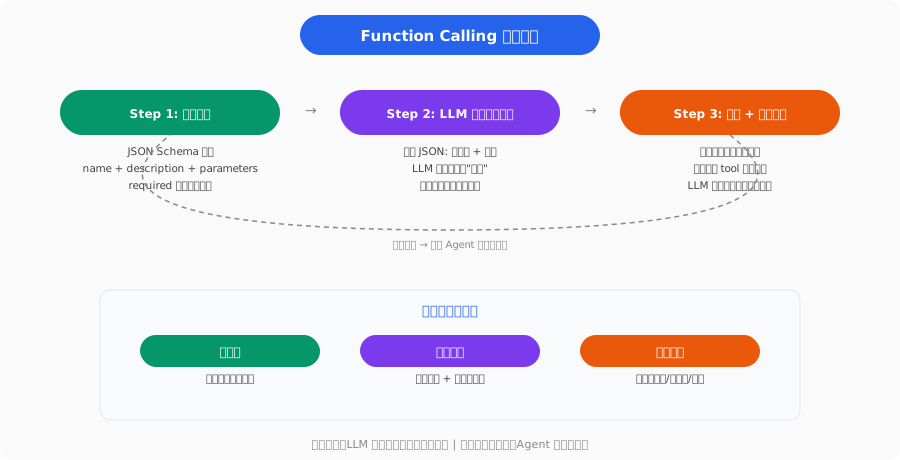
Function Calling 的核心思想
Function Calling 的流程分三步:
- 定义工具:告诉 LLM 有哪些工具可用,每个工具做什么、需要什么参数
- LLM 选择工具:LLM 根据用户请求,输出"我要调用哪个工具、传什么参数"(注意:LLM 只是输出文本,不是真的调用)
- 执行并回传:你的代码解析 LLM 的输出,真正执行工具,把结果作为新消息传回 LLM
用户: "北京明天多少度?"
  ↓
LLM 输出: {"tool": "get_weather", "args": {"city": "北京", "date": "tomorrow"}}
  ↓
你的代码: 调用真实天气 API → 得到 {"temp": 12, "condition": "多云"}
  ↓
把结果传回 LLM: "天气查询结果:北京明天多云,12°C"
  ↓
LLM 生成最终回复: "北京明天多云,最高温 12°C,建议带一件外套。"
核心直觉:LLM 不执行工具,它只是"决定"要调用什么工具。真正的执行在你的代码里。LLM 扮演的角色是一个"决策引擎"。
工具定义:JSON Schema
Function Calling 的第一步是告诉 LLM 有哪些工具可用。工具定义使用 JSON Schema 格式,这是目前所有主流 LLM 的统一标准。
一个天气查询工具的定义
{
    "type": "function",
    "function": {
        "name": "get_weather",
        "description": "查询指定城市的天气信息,包括温度、天气状况和风力等级",
        "parameters": {
            "type": "object",
            "properties": {
                "city": {
                    "type": "string",
                    "description": "城市名称,如'北京'、'上海'"
                },
                "date": {
                    "type": "string",
                    "enum": ["today", "tomorrow", "day_after"],
                    "description": "查询日期"
                },
                "unit": {
                    "type": "string",
                    "enum": ["celsius", "fahrenheit"],
                    "description": "温度单位,默认 celsius"
                }
            },
            "required": ["city", "date"]
        }
    }
}
关键字段:
| 字段 | 作用 | 注意事项 |
|---|---|---|
| name | 工具的唯一标识 | 用英文蛇形命名,如 get_weather |
| description | 告诉 LLM 这个工具做什么 | 写得越清楚,LLM 选择越准确 |
| parameters | 参数的 JSON Schema | 每个参数都要写 description |
| required | 必填参数 | LLM 会被强制提供这些参数 |
| enum | 可选值限制 | 减少 LLM 传错参数的概率 |
定义多个工具
实际应用中,你会同时提供多个工具:
tools = [
    {"type": "function", "function": {"name": "get_weather", ...}},
    {"type": "function", "function": {"name": "search_web", ...}},
    {"type": "function", "function": {"name": "run_python", ...}},
    {"type": "function", "function": {"name": "calculator", ...}},
]
LLM 会根据用户请求自动选择最合适的工具。
完整代码示例:OpenAI 接口
以 OpenAI 的接口为例,演示完整的 Function Calling 流程:
import json
from openai import OpenAI

client = OpenAI()

# 1. 定义工具
tools = [
    {
        "type": "function",
        "function": {
            "name": "get_weather",
            "description": "查询指定城市的实时天气",
            "parameters": {
                "type": "object",
                "properties": {
                    "city": {"type": "string", "description": "城市名"},
                },
                "required": ["city"]
            }
        }
    },
    {
        "type": "function",
        "function": {
            "name": "calculator",
            "description": "执行数学计算",
            "parameters": {
                "type": "object",
                "properties": {
                    "expression": {
                        "type": "string",
                        "description": "数学表达式,如 '2 + 3 * 4'"
                    }
                },
                "required": ["expression"]
            }
        }
    }
]

# 2. 工具的实际执行函数(你自己写的)
def execute_tool(name, arguments):
    if name == "get_weather":
        # 模拟天气 API
        return {"city": arguments["city"], "temp": 12, "condition": "多云"}
    elif name == "calculator":
        return {"result": eval(arguments["expression"])}  # 实际中请用安全的计算方式
    return {"error": f"未知工具: {name}"}

# 3. 第一轮:LLM 决定调用什么工具
messages = [{"role": "user", "content": "北京今天多少度?"}]

response = client.chat.completions.create(
    model="gpt-4o",
    messages=messages,
    tools=tools,
    tool_choice="auto"  # 让 LLM 自己决定是否使用工具
)

choice = response.choices[0]

# 4. 检查 LLM 是否要调用工具
if choice.message.tool_calls:
    for tool_call in choice.message.tool_calls:
        name = tool_call.function.name
        args = json.loads(tool_call.function.arguments)

        # 执行工具
        result = execute_tool(name, args)

        # 5. 把工具结果传回 LLM
        messages.append(choice.message)  # 加入 LLM 的原始消息
        messages.append({
            "role": "tool",
            "tool_call_id": tool_call.id,
            "content": json.dumps(result, ensure_ascii=False)
        })

    # 6. 第二轮:LLM 根据工具结果生成最终回复
    final_response = client.chat.completions.create(
        model="gpt-4o",
        messages=messages,
        tools=tools
    )

    print(final_response.choices[0].message.content)
    # 输出: "北京今天 12°C,天气多云。"
这段代码展示了 Function Calling 的完整生命周期。注意 tool 角色的消息——这是专门用来传回工具结果的。
不同厂商的接口差异
虽然核心思路一样,但不同 LLM 提供商的 Function Calling 接口有细微差异:
OpenAI(GPT 系列)
使用 tools 参数和 tool_calls 返回:
response = client.chat.completions.create(
    model="gpt-4o",
    messages=messages,
    tools=tools,
    tool_choice="auto"
)
# 返回值: response.choices[0].message.tool_calls
Anthropic(Claude 系列)
使用 tools 参数,工具调用在 content 中以 tool_use block 返回:
response = client.messages.create(
    model="claude-sonnet-4-20250514",
    messages=messages,
    tools=tools  # 格式略有不同,不需要 "type": "function" 外层
)
# 返回值: 遍历 response.content,找 type == "tool_use" 的 block
DeepSeek
接口与 OpenAI 高度兼容:
client = OpenAI(base_url="https://api.deepseek.com", api_key="...")
# 用法和 OpenAI 基本一致
实际建议:如果你同时需要支持多个 LLM,推荐用 LangChain 或 LiteLLM 这类抽象层来屏蔽接口差异。第四阶段的实战文章会用到。
工具设计原则:什么样的工具是好工具?
不是所有功能都适合封装成工具。设计工具时需要遵循几个原则:
1. 原子性:一个工具做一件事
# ❌ 差的工具:职责不清
{"name": "process_data", "description": "处理数据(清洗、分析、可视化)"}

# ✅ 好的工具:职责明确
{"name": "clean_csv", "description": "清洗 CSV 文件,去除空行和重复行"}
{"name": "analyze_csv", "description": "对 CSV 数据执行统计分析"}
{"name": "create_chart", "description": "根据数据生成图表"}
2. 参数要少而精
# ❌ 参数太多,LLM 容易搞混
{"name": "search", "parameters": {
    "query": ..., "language": ..., "country": ..., "date_range": ...,
    "site": ..., "file_type": ..., "safe_search": ..., "num_results": ...
}}

# ✅ 关键参数 + 合理默认值
{"name": "search", "parameters": {
    "query": {"type": "string", "description": "搜索关键词"},
    "num_results": {"type": "integer", "default": 5, "description": "返回结果数量"}
}}
3. Description 要写得足够清晰
Description 是 LLM 决定是否使用这个工具的主要依据。含糊的描述会导致 LLM 选错工具或传错参数。
# ❌ 含糊: "获取信息"
{"name": "get_info", "description": "获取信息"}

# ✅ 清晰: 说明了做什么、什么时候用、输入输出
{"name": "get_stock_price", "description": "查询 A 股上市公司的实时股价。
    输入股票代码(如 600519),返回当前价格、涨跌幅和成交量。
    仅支持 A 股,不支持港股和美股。"}
并行工具调用
现代 LLM 支持在一次响应中调用多个工具(Parallel Tool Calls)。比如用户问"对比北京和上海的天气",LLM 可以同时发起两次天气查询:
# LLM 的响应中可能包含两个 tool_calls
tool_calls = [
    {"id": "call_1", "function": {"name": "get_weather", "arguments": '{"city": "北京"}'}},
    {"id": "call_2", "function": {"name": "get_weather", "arguments": '{"city": "上海"}'}}
]

# 并行执行两个工具
results = []
for call in tool_calls:
    result = execute_tool(call.function.name, json.loads(call.function.arguments))
    results.append({
        "role": "tool",
        "tool_call_id": call.id,
        "content": json.dumps(result)
    })

# 所有结果一起传回 LLM
messages.extend(results)
并行调用可以显著减少 Agent 的循环次数和总延迟。但要注意:不是所有工具都适合并行——如果后一个调用依赖前一个的结果,就必须串行执行。
下一步
现在你已经理解了 Agent 循环(05)和工具调用(06)的完整机制。但还有一个问题:当你有十几个工具时,Agent 每次行动都要从所有工具中选择,效率低、容易选错。
下一篇 07 | 从 Tool 到 Skill 会讲怎么把多个工具组合成更高层的"技能",以及 Anthropic 提出的 MCP 协议如何让工具连接变得标准化和即插即用。
推荐资源
- OpenAI Function Calling 文档 — 官方教程,最权威的参考
- Anthropic Tool Use 文档 — Claude 的工具调用接口说明
- Gorilla LLM — 专门研究 LLM 工具调用的学术项目